iCSee is a mobile application that connects to Wi-Fi surveillance cameras and allows users to monitor video feeds remotely. The app is commonly used with network cameras that support cloud services and remote viewing. Once connected, users can access real-time video, playback recorded footage, and manage camera settings through a single interface.
The app is available for both Android and iOS devices, making it accessible to most smartphone users. After linking the camera to the app, users can monitor their cameras from anywhere with an internet connection, which adds convenience and peace of mind.
Main Features of iCSee
- Live video streaming from connected cameras
- Motion detection alerts and notifications
- Remote camera control through the mobile app
- Video playback and recording storage
- Support for multiple cameras in one account
- Night vision monitoring for low-light environments
These features make iCSee suitable for home security monitoring, small office surveillance, and property observation.
Pros of iCSee
1. Remote Monitoring
The app allows users to view camera feeds from anywhere using their smartphone. Whether checking on a home while traveling or monitoring a shop after closing hours, remote access provides added convenience.
2. Supports Multiple Cameras
Users can connect several cameras to one account and monitor them within the same application. This is helpful for households or businesses that require coverage in multiple rooms or areas.
3. Motion Detection Alerts
When motion is detected, the app can send notifications to the user’s phone. This allows users to quickly check the camera feed and see what is happening in real time.
4. Affordable Camera Compatibility
iCSee is commonly used with many budget-friendly security cameras. This makes it a practical option for people who want a simple monitoring system without investing in expensive equipment.
5. Two-Way Audio Support
Some compatible cameras support two-way audio, allowing users to speak through the camera using the app. This feature can be useful for communicating with family members or warning intruders.
Cons of iCSee
1. Interface Can Feel Basic
While functional, the user interface is relatively simple and may not feel as polished as some premium smart home apps.
2. Dependence on Internet Connection
Because the app relies on network connectivity, video streaming quality may be affected by slow or unstable internet connections.
3. Limited Advanced Security Features
Compared with high-end security platforms, the app may lack advanced features such as AI object detection or detailed automation settings.
4. Compatibility Depends on Camera Model
Not all IP cameras support iCSee, and some features may vary depending on the manufacturer of the camera hardware.
How to Use iCSee
Setting up and using iCSee usually takes only a few minutes if the camera is compatible with the app.
Step 1: Download the App
Install the iCSee application from the Google Play Store or Apple App Store on your smartphone or tablet.
Step 2: Create an Account
Open the app and register using an email address or phone number. Creating an account allows you to manage multiple cameras and access your devices remotely.
Step 3: Connect Your Camera
Power on your Wi-Fi camera and follow the instructions within the app to add a new device. Usually, this involves scanning a QR code or connecting the camera to your Wi-Fi network.
Step 4: Configure Camera Settings
Once connected, adjust settings such as motion detection sensitivity, recording options, and notification preferences.
Step 5: Start Monitoring
After setup is complete, you can view the live camera feed directly from the app dashboard. You can also switch between cameras, play back recordings, or control camera angles if the device supports pan-tilt functions.
Who Should Use iCSee?
iCSee is well suited for users who want an affordable and simple surveillance solution. Homeowners can use it to monitor entrances or indoor areas, while small businesses may use it to keep an eye on shops, offices, or storage spaces.
It is particularly useful for people who purchase compatible budget IP cameras and need a straightforward mobile app to manage them.
Overall, iCSee provides a practical way to monitor security cameras remotely. While it may not include all the advanced features of premium security platforms, it performs well for everyday surveillance tasks and offers a convenient solution for basic home or office monitoring.





 APK
APK  Google Play
  iOS
iOS  4.20
4.20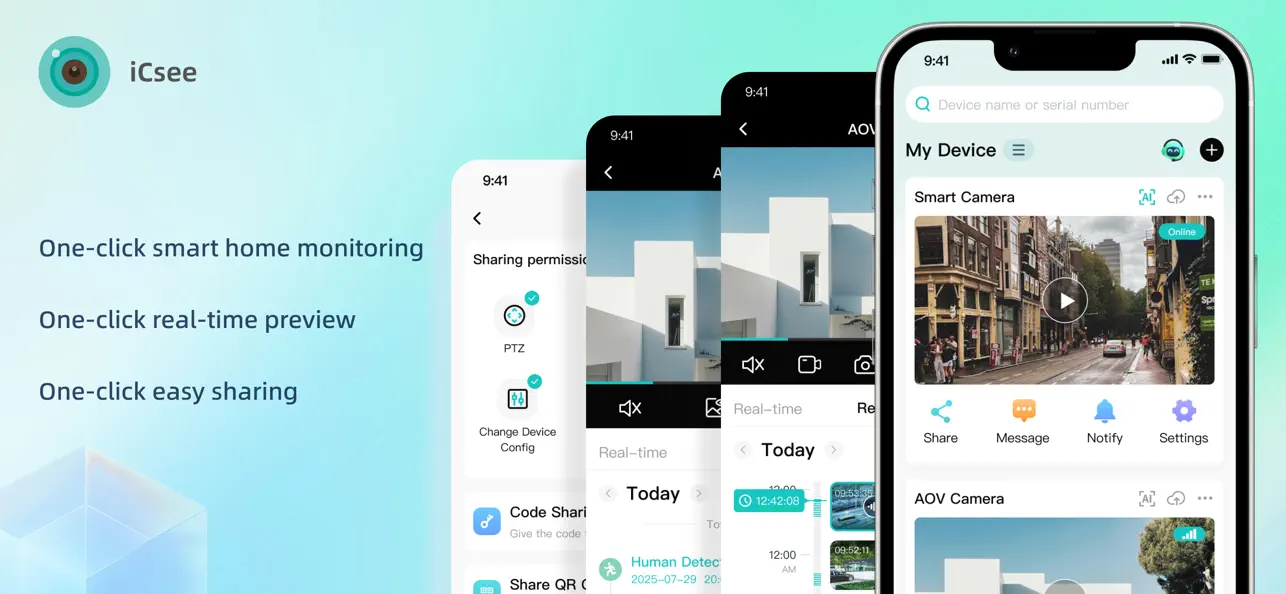
 Download